
Examples
Only Recipes
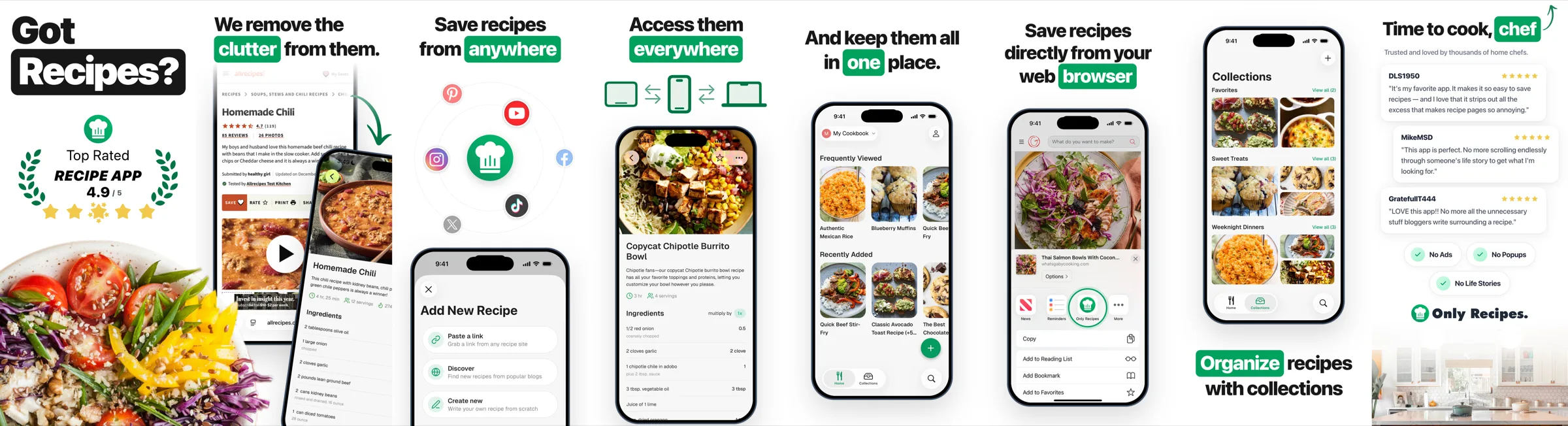
The Only Recipes example: eight iOS and eight Android screenshots built with CDN Tailwind, oversized headlines, highlighted keywords and real app captures.
Only Recipes is a recipe keeper. Its screenshots are the source of the design patterns in the Open Assets skill.
| Collection | Source size | Templates | Locales | Exports |
|---|---|---|---|---|
iOS ios | 440×956 | 8 | - | iPhone 6.9" (1320×2868), iPhone 6.7" (1290×2796), iPhone 6.5" (1284×2778), iPhone 6.1" (1179×2556) |
Android android | 440×978 | 8 | - | Phone (1080×2400) |
Source: examples/only-recipes on GitHub.
Techniques
- Tailwind from the CDN. Each template loads
https://cdn.tailwindcss.comand setstailwind.configinline with the brand colors (brand-green,brand-black,star). No build step, at the cost of needing network access during renders. - The oversized headline. A huge black word, then a keyword in a filled rounded box: the "Got Recipes?" pattern quoted in the skill.
- Composed captures. Some screenshots combine several app captures (
02A.png,02B.png) with arrows and badges frompublic/(arrow.svg,laurel.svg,rating.svg). - iOS and Android. The
ioscollection (440x956, four iPhone sizes) and theandroidcollection (440x978, 1080x2400) use separate template folders with the same eight stories. - Default output layout. No
outFile, so renders go toexports/<collection>/<size>/<template>.png.
Run it
There is no package.json. Run the CLI from the example folder:
cd examples/only-recipes
npx -p @open-assets/open-assets open-assets dev
npx -p @open-assets/open-assets open-assets render --force
What to copy
- The headline and keyword patterns, if you want bold, high-contrast App Store screenshots.
- The CDN setup for a quick start. Move to compiled Tailwind (as in Skimmer) when you want offline, reproducible renders.
Last updated on
Tax Days
The Tax Days example: App Store and Google Play screenshot collections sharing one 38-locale strings file, with phone and tablet sizes written through outFile.
Thoughtful
The Thoughtful example: seven App Store screenshots and an icon with a warm Tailwind v4 theme, glow orbs, decorative flourishes and an SVG icon wrapped in HTML.